SB Order No. 08/2021
F.No. 113-03/2017-SB(Pt-I)
Govt. of India
Ministry of Communications
Department of Posts
(FS Division)
Dak Bhawan, New Delhi-110001
Dated: 30.04.2021
To,
All Heads of Circles / Regions
Subject: – Introduction of “Basic Savings Accounts” under Post Office Savings Account Scheme 2019 to facilitate opening of Zero Balance Accounts by beneficiaries of any Government Welfare Scheme and reduction in account maintenance fee on PO Savings Account – regarding.
*****
Madam / Sir,
The undersigned is directed to say that Ministry of Finance (DEA) vide its O.M. No. 14/10/2021-NS dated 13.04.2021 duly appended notification No. G.S.R. 257(E) dated 09.04.2021 has incorporated another category of PO Savings Account called “Basic Savings Account” under new inserted paragraph 3 of Post Office Savings Account Scheme 2019 and reduction in Account Maintenance Fee on PO Savings Account. Copy of notification is attached.
2. Account Maintenance Fee prescribed in rule 4(6) of Post Office Savings Account Scheme 2019 has been revised from Rs. 100 (One hundred rupees) to Rs. 50 (Fifty) inclusive of GST. Account Maintenance Fee will not be applicable on Basic Savings Account.
3. Basic Savings Account has been restored through aforesaid gazette notification. The procedure to be followed for opening and operating these accounts is given below :-
i) A registered adult member of any Government Welfare Scheme can open Basic Savings Account at any Post Office including GDS Branch Post Offices.
ii) A guardian of a minor whose name is registered for any Government Welfare Scheme can also open Basic Savings Account on behalf of minor.
iii) Only one Basic Savings Account can be opened by the beneficiary and guardian of beneficiary.
iv) Any Government benefit and any other deposit can be made in these accounts.
v) Basic Savings Account will be governed by Post Office Savings Account Scheme 2019 & Government Savings Promotion General Rules,2018.
vi) Only a single account can be opened under Basic Savings Account.
vii) The depositor who desires to open Basic Savings Account under this category has to provide copy of letter/card issued by a competent authority of any State or Central Government Department mentioning name of beneficiary under any welfare scheme, copy of letter/ Aadhaar card issued by UIDAI, Account Opening Form & KYC form.
viii) The postmaster concerned will compare copy of this document with the original under his/her dated signatures.
ix) While opening Basic Savings Accounts, scheme code and registration / enrolment / reference number of the beneficiary contained in letter/card issued by competent authority of any State of Central Government or letter/card number and date should be entered in the field provided for entering Job Card No. in Finacle/Sanchay Post and Aadhaar no. of the beneficiary.
x) All other formalities applicable to PO Savings Account i.e. Specimen Signature, issue of PR in GDS Branch Post Offices, issue of passbook etc. should be followed.
xi) Interest will be calculated and credited in Basic Savings Accounts by following the normal procedure laid down for PO Savings Account.
xii) All existing Basic Savings Account will also be incorporated and treated as Basic Savings Account.
xiii) Other facilities like Cheque Book, ATM Card, eBanking, mBanking may be availed by Basic Savings Account holders, subject to fulfillment of eligibility conditions for these services. For the purpose minimum balance of Rs. 500 is to be maintained by account holder and Basic Savings Accounts may be converted in to PO Savings Account.
4. Where circle received proposal from State Government for bulk account opening under any Governments Welfare Scheme, Circle may proceed for bulk account opening after taking list of beneficiaries, AOF, KYC form, Aadhaar from respective State Government/Beneficiaries.
5.This is issued with the approval of DDG (FS).
Encl: As above
Your’s Faithfully,
(Devendra Sharma)
Asst. Director (SB-II)
SB Order No. 09/2021
F. No. FS-13/7/2020-FS
Govt. of India
Ministry of Communications
Department of Posts
(FS Division)
Dak Bhawan, New Delhi-110001
Dated: 30 .04.2021
To,
All Head of Circles/Regions
Subject:- Payment of MIS/SCSS/TD accounts Monthly/Quarterly/ Annual interest amount and maturity value of MIS/SCSS/TD/RD/ KVP/NSC into account holder’s Bank Account by CBS Post Offices – Reg.
Sir/Madam,
The provision for payment of interest of MIS/SCSS/TD accounts and credit of maturity value for TDA type of accounts (MIS/SCSS/TD/RD/KVP/NSC) into account holder’s Bank Account has been implemented in Finacle through ECS Outward Credit functionality.
2. Chennai GPO is identified as Nodal Office for ECS Outward Credit functionality. Interest and Maturity credits through ECS Outward facility
3. The summary of the ECS Outward Credit facility is detailed below:-
(i) Account holder will submit ECS Mandate Form along with passbook and a cancelled cheque or copy of first page of Bank passbook at concerned post office.
(ii) Counter PA will modify respective account and enter ECS details on the basis of cancelled cheque/copy of first page of Bank passbook in respective account modification menu.
(iii) Supervisor will verify the account modification and file the ECS mandate form in a Guard file.
(iv) On Due date of interest payment i.e. MIS/SCSS/TD the interest will be processed and credited in ECS Outward credit Suspense account. Chennai GPO will generate ECS files for uploading to NPCI. Interest will get credited to account holder’s other Bank Account on D+1 basis.
(i) Account holder will submit account closure form along with passbook and a cancelled cheque or copy of first page of Bank passbook at concerned post office.
(ii) Counter PA will modify respective account and enter ECS details on the basis of cancelled cheque/copy of first page of Bank passbook in respective account modification menu.
(iii) Supervisor will verify the account modification and file ECS mandate form in a Guard file.
(iv) Counter PA will close account the account by selecting option “Customer Instruction” in respective scheme’s closure menu.
(v) Supervisor will verify account closure.
(vi) Supervisor will run HPR menu and print account closure report and handover to account holder as acknowledgement.
(vii) Chennai GPO will generate ECS credit file on next day for all such transactions and upload outward credit files to NPCI.
(viii) The interest and maturity value will be credited in the account holder’s Bank Account on D+1 basis i.e. Next working day.
(i) Chennai GPO will credit ECS return amount in respective Post Office’s ECS Outward Suspense Account (SOL ID+0098).
(ii) Respective post office will check ECS Outward Suspense Account (SOL ID+0098) and contact concerned account holder for intimating the ECS returns.
(iii) Respective post office will pay the ECS return amount through cash (below Rs.20,000) or by Cheque/credit into PO Savings Account (Rs.20,000 or more).
(iv) In order to avoid ECS returns for subsequent months, in respect of Interest pay outs, respective Post office will immediately modify the ECS mandate details in account modification menu by collecting new ECS Mandate form.
(v) If customer is unable to provide correct Bank account details, ECS mandate can be modified to No in account modification menu and verified by Supervisor.
4. A detailed “Standard Operating Procedure for Crediting MIS/SCSS/TD Interest and TDA Closures to OTHER BANK ACCOUNTS through ECS” has been prepared and enclosed herewith for information, guidance and necessary action.
5. The non-CBS Post Offices will continue to follow existing process .i.e. this functionality is not applicable in non-CBS Post Offices.
6. It is requested to circulate this amendment to all CBS Post Offices for information, guidance and necessary action. Same may also be placed on the notice board of all Post Offices in public area. Adequate promotion of this functionality is to be done to avoid cheque issuance and speedy payment to the depositors.
7. Hindi version will be issued in due course.
8. This issues with the approval of Competent Authority.
Enclosed:- i) Annexure
Yours faithfully,
(Devendra Sharma)
Assistant Director (SB-II)
Annexure
Introduction
Currently only MIS/SCSS Interest credits are paid through other bank accounts through outward ECS. Patches have been deployed for crediting Pre Mature / Post Maturity Closures of all TDA schemes to OTHER BANK ACCOUNTS through ECS Outward Credit (i.e. Through ECS credit in depositor‟s Other Bank Account). Electronic Mode of withdrawal (Outward Credit) will be in addition to Cash/Cheque /POSB modes. ECS Outward Credits are handled through NACH Outward Credit. Chennai GPO is nodal office for NACH. SBA Schemes (SB/SSA/PPF) are not covered under Electronic Mode of withdrawal currently.
Existing Difficulties in Issuing Postmaster Cheques for Maturity proceeds
The following difficulties are being faced currently in payment of closure proceeds through Postmaster Cheques
– Maximum Sub Offices are not authorized to issue cheque.
– Sub Offices are requesting cheque through respective HOs.
– It takes atleast 2 to 5 days for receipt of Cheque from HO.
– Account holder need to visit Post Office to collect cheque and visit his bank to deposit cheque in other bank account.
– As per latest GSPR, PMI is applicable till date of closure. Difference of interest is reported due to difference in date of closure and date of receipt of cheque.
To overcome the above difficulties provision for crediting maturity/prematurity closure proceeds of TDA type of accounts (RD/TD/MIS/SCSS/KVP/NSC) developed in Finacle. The detailed process for transfer of maturity/pre-maturity proceeds/Monthly/Quarterly Interest in account holders OTHER BANK ACCOUNT is given below
Part-A
If a depositor of MIS/SCSS/TD account desires that his/her periodic interest (monthly/quarterly/yearly as the case may be) to be credited directly in OTHER BANK ACCOUNT, depositor can avail this facility through ECS outward. The following process to be followed in such cases.
i) This facility can be availed at the time of opening of account or any time before maturity. If ECS facility for interest payout is opted after account opening, SOL has to ensure that the interest amount available in Sundry accounts, if any, is paid out separately. ECS instruction will be effective from the next payout onwards.
ii) To avail this facility depositor shall submit ECS Mandate form at the time of account opening or thereafter.
iii) With ECS mandate form depositor shall submit passbook, a cancelled cheque leaf or first page of other bank passbook at the concerned Post Office.
iv) After receipt of ECS Mandate form, counter PA will check the name of depositor on
cancelled cheque leaf or first page of passbook with respective POSB account‟s passbook.
v) User to invoke the respective account modification menu and update ECS mandate for existing accounts.
i.e. CMISAM – MIS/TD
CSCAM – SCSS
vi) ECS details can be updated during new account opening also.
Procedure for updating ECS Mandate details in Account Opening/Account Modification menus
ECS
| ECS Flag | Yes | |
| Flow code | Monthly/Quarterly/Yearly Interest Payout | |
| IO (Interest Outflow) alone to be selected from searcher for Interest Payout. | ||
| ECS Mandate details | ECS Mandate details to be entered | |
| PaySys id | Select ECS and click on empty space/tab-out, so that Account ID of nodal office will be auto populated in Account ID field | |
| Transaction Code | CODE1 ONLY to be selected from searcher. | |
| Other Party A/c. id | Account holder’s OTHER BANK ACCOUNT number. User to note that this account number cannot be validated in Finacle, and hence number should double-checked before clicking Submit to avoid mistakes. | |
| Other Party name | Name of customer as per OTHER BANK ACCOUNT | |
| Other Bank/Branch City Code | This field is disabled. This will get auto populated once MICR Code field is entered correctly. | |
| MICR Code | MICR code available on cheque/passbook is of 9 digits i.e. 302002024 (here 302 is MICR City code, 002 is the MICR Bank code and 024 is the MICR Branch Code) Enter 9 digits of MICR code in this field | |
Note: – User shall enter value in above mentioned fields only, User shall not enter or change any value in other fields.
vii) Click on Submit.
viii) After modification, the account should be verified by the Supervisor.
ix) ) Supervisor must tally account number, depositor name, city code, bank code, branch code with mandate form, cancelled cheque/copy of first page of passbook.
x) ECS mandate form shall be filed in a Guard file in the Post Office.
ECS-I
Electronic Clearing Service (ECS) for Credit Clearing Mandate Form
(Account holder‟s option to receive payment through Credit Clearing Mechanism)
1. Name of Account Holder(s) : –
2.
| SL. No. | Type of Account (MIS/SCSS/TD) | Account Number |
| 01 | ||
| 02 | ||
| 03 | ||
| 04 | ||
| 05 |
2. Account Number (MIS/TD/SCSS etc) : –
3. Particulars of Bank Account in which interest amount to be credited:
A. Name of the Bank : –
B. Name of the branch : –
C. Bank Account Number (Savings) & Code :-
D. 9- Digit MICR Code : –
Note:- Please attach a blank cancelled cheque or self attested photocopy of front page of your savings account passbook issued by your bank for verification of the above particulars.
4. Mobile Number: –
5. Date of Effect: –
i) I hereby declare that the particulars given above are correct and complete. If the transaction is delayed or not effected at all for reasons of incomplete or incorrect information, I would not hold the Post Office or Bank responsible. I have read the conditions prescribed under Appendix I of POSB (CBS) Manual for ECS facility.
ii) In case of ECS returns due to any reason, I will take payment of ECS return amount from the concerned Post Office.
Date: –
(……………………………………….)
Signature of the Account holder(s)
Certified that the particulars furnished above are correct as per our records.
Date Stamp
(……………………………………….)
Signature of the APM/SPM/PM with stamp
Part-B
i) At the time of premature/maturity closure, depositor to write Bank Account No, MICR code and Mobile number in Acquittance portion of Account Closure/Premature Closure form along with cancelled cheque/copy of first page of other bank passbook along with his/her passbook and account closure/premature closure form.
ii) Counter PA shall tally the name of the depositor with Cancelled cheque leaf/copy of bank passbook.
iii) Counter PA shall enable ECS option through account modification menu of the relevant scheme.
i.e. CMISAM – MIS/TD/NSC, KVP issued on or after 01.07.2016
CSCAM – SCSS,
CSCACM – NSC/KVP certificates issued before 01.07.2016
CRDACM– RD
iv) The following fields alone to be entered in respective account modification menu. User shall not enter any value/change value in remaining field.
ECS
| ECS Flag | Yes | |
| Flow code | Pre Mature/Maturity Closures | |
| 1. For TD/MIS/SCSS account user need to select ‘IO’ (Interest Outflow) flow code (for PMI) and then Add ‘PO’ (Principal Outflow) flow separately.
If IO is already available for Interest, PO alone to be selected before closure. 2. For NSC/KVP and RD accounts, TO (Total Outflow) flow code to be selected | ||
| ECS Mandate details | ECS Mandate details to be entered | |
| PaySys id | Select ECS and click on empty space/tab-out, so that Account ID of nodal office will be auto populated in Account ID field | |
| Transaction Code | CODE1 ONLY to be selected from searcher. | |
| Other Party A/c. id | Account holder’s OTHER BANK ACCOUNT number. User to note that this account number cannot be validated in Finacle, and hence number should double-checked before clicking Submit to avoid mistakes. | |
| Other Party name | Name of customer as per OTHER BANK ACCOUNT | |
| Other Bank/Branch | This field is disabled. This will get auto populated once | |
a. Click on Submit.
Note:
1. Both PO (Principal Outflow) & IO (Interest Outflow) flow code to be selected for TD/MIS/SCSS accounts one by one. Both PO and IO flowcodes will be available for TD/MIS/SCSS accounts.
2. For NSC/KVP/RD accounts, ONLY TO (Total Outflow) flow code to be selected. Only TO flow code will be available for NSC/KVP/RD.
3. For existing accounts where ECS is already enabled, MICR Code field will be blank. This can be updated with existing MICR code if required.
4. In case any MICR code is not available in the database respective PO will take up the issue through CPC to CEPT for addition of that MICR code.
vi) After enabling ECS as prescribed above, account modification is to be verified by Supervisor. Supervisor must ensure correctness of Bank Account Number, Account holder Name, City code, Bank Code and Branch code from cancelled cheque leaf/copy of first page of other bank passbook. MICR Code entered under ECS Mandate details table will be available for verification.
vii) After verification of account modification, Counter PA should proceed for Account closure through respective closure menu. One new mode of repayment “Customer Instruction” is available for selection in Closure menus under Close Mode (HCAACTD menu) and Repayment Mode (CRDCAAC & CSCCAAC).
During Closure, Customer Instruction option should be selected from the Repayment Mode/Close Mode dropdown if the PreMature/Maturity Proceeds are to be credited to Other Bank Account.
a. CRDCAAC _ RD Closure
b. CSCCAAC – SCSS Closure
c. HCAACTD – TD/MIS/KVP/NSC
Note:
1. Error “Customer instruction close mode can be used only when ECS is enabled for PO and IO” will be thrown during closure if PO or IO alone is selected for MIS/SCSS/TD accounts.
2. Error “For A/c ID xxxxx Customer Instruction Close Mode can be used only when ECS is enabled and Proper Mandate is given” will be thrown during closure if TO is not selected for NSC/KVP/RD accounts.
viii) Account closure to be verified by the Supervisor.
ix) After verification of Closure, account closure report will be automatically generated in Supervisor login.
x) Supervisor will invoke HPR menu and print account closure report generated in Finacle. This report has to be printed immediately as print logs will be cleared frequently.
xi) Supervisor will sign and seal on this account closure report and provide the closure report as acknowledgement of account closure to the customer.
xii) ECS mandate form along with cancelled cheque leaf/copy of first page of passbook to be attached with account closure form/premature account closure form and sent to SBCO along with vouchers.
Note:-
i) ECS Outward Credits are routed through NACH Outward Credit (National Automated Clearing House)
ii) Chennai GPO is Nodal office for ECS Outward credits. Hence ECS Outward Credit Suspense office account (600001000098) will be defaulted in Account ID field during selection of ECS flag. This is currently editable field. Post offices not to change this account ID.
iii) After successful closure and verification, Pre Mature/Maturity Closure proceeds will be credited into Nodal Sol ECS Outward Credit Suspense account (600001000098).
iv) Chennai GPO will generate ECS Outward file on the next working day and upload to NPCI for crediting into other bank accounts.
v) Customers will get their maturity credits on D+1 working day (D = Date of Closure) in other bank account.
vi) ECS Outward credit facility is not available for
a. SB, PPF, SSA, NSS87 and NSS92 schemes closures
b. NSC/KVP Bulk closures using menu CNSBCV
vii) Maturity value/Premature closure in case of deceased claim closure may also be credited through ECS Outward Credit facility. For the purpose nominee/claimant shall submit copy of deceased claim sanction along with cancelled cheque/copy of first page of passbook of his/her account.
viii) ECS Outward credit facility can be used for Death Claim cases also. Bank accounts of Nominee/Legal heir can be updated in ECS Mandate details.(this can be removed sir)
REPORTS
Counterwise Report for ECS
1. PO can generate Counter wise Report for ECS in HFINRPT for a given date range
2. From date and To date and sol id are input fields
3. Both Interest/Closure accounts which were credited through ECS to other bank will be listed in this report.
4. Supervisor will check and verify with ECS mandate form received for the date with this report and after tallying place in a guard file.
Handling of ECS Returns
1. ECS Outward credit might get returned due to incorrect other bank account number or account already closed.
2. Nodal office (Chennai GPO) will credit the ECS return amount to Outward credit ECS Suspense account (SOL ID+0098) of concerned CBS Post Office. Account Number will be updated in the reference number field on next day immediately after receipt of ECS returns.
3. Customer will visit concerned PO in case the amount is not credited in other bank account. Concerned POs will regularly check credits in ECS suspense account (SOL ID+0098).
4. If any ECS is returned and credits if available in ECS suspense account (SOL ID+0098) concerned Post Office will intimate the depositor reason for non credit of ECS through mobile number available with Post office requesting customer to attend Post Office for collecting maturity value as cash if maturity value is below Rs.20000/-.
5. If the maturity credits are above Rs.20000/-, amount to be credited into Postmaster Cheque office account (SOL ID+0340) from ECS Suspense account and to be paid as Postmaster cheque . In case of Sub Office they will collect the cheque from their respective HO.
6. PO will use CTM menu for debiting ECS Outward credit of their SOL and pay in Cash if the amount is below Rs.20000/. If the amount is above Rs.20000/-, PO will use CXFER to crediting from ECS Suspense to their 0340 account for paying through cheque.
7. Post office should pay Cash or Cheque ONLY if ECS return amount is available as credit in ECS Outward credit Suspense account (SOL+0098).
Role of Circle CPCs
1. Chennai GPO will send mail to all CPCs on the failed ECS records daily
2. Concerned CPC will guide the respective SOL to contact customer for payment through cash (if below Rs.20000/- or through cheque)
3. CPC will guide the POs that ECS Suspense account is to debited only if valid credits are available.
4. Circle CPC will guide the PO to modify the ECS Mandate by getting revised ECS Mandate from customer in case of ECS failure for interest credits to avoid failure in subsequent months.
5. CEPT Team will share list of offices where 0098 is Non Zero on weekly basis to all CPCs/uploaded in MIS Portal. This should be forwarded to all POs.
Role of SBCO
1. On receipt of voucher by SBCO, SBCO will generate counterwise report for ECS from production server for respective office.
2. After generating this report SBCO will tally account number, MICR code available in counterwise report for ECS with cancelled cheque leaf/copy of first page of passbook attached with account closure/premature closure form.
3. SBCO will also check the Non Zero ECS outward credits office account (SOL ID+0098)and ensure that no debits are done without valid credits.
Role of Inspecting Authorities.
1. During course of inspection of the CBS office respective guard file of mandate form to be checked and tallied with Counter wise Report for ECS in HFINRPT for a given date range.
2. Ideally ECS returned customer should be contacted and maturity/Interest amount to be paid by concerned PO. Monitor transactions in ECS Outward credit suspense account (0098) through HACLINQ menu and also ensure that the balance of this office account should be zero.
3. In case of any discrepancy, issue necessary instruction to clear pendency and record reason and result.
Role of Nodal office (Chennai GPO)
1. Chennai GPO is the nodal office of ECS Outward credit
2. ECS outward credit Suspense account of Chennai GPO will be populated in all ECS closure/interest credits.
3. Chennai GPO will generate ECS Outward credit txt file on next day and submit to NPCI before 8:00 AM to NPCI without fail.
4. Interest /Maturity /Premature closure ECS credits will get included in single txt file
5. This file will be uploaded to NPCI after regular validations.
6. ECS credits may get rejected due to reason like other bank account number incorrect, account closed.
7. Chennai GPO will share the list of SOLs which has ECS returns to CEPT EOD team for enabling Intersol parameter for these SOLs ECS Outward Credit Suspense account.
8. CEPT EOD team immediately on receipt of information from Chennai GPO will enable Intersol only for those SOL (SOL ID+0098) accounts and send confirmation to Chennai GPO.
9. Chennai GPO will credit the return amount to concerned SOL ECS Outward credit Suspense account (SOL ID + 0098) through HTTUM in bulk. This should be done daily without fail immediately on receipt of ECS RETURNS. (Process). This should be done daily without fail.(This can be removed)
10. Chennai GPO will intimate EOD team to revert Intersol parameter once the amount is transferred.
11. CEPT EOD team will disable intersol paramter for the sols which were enabled immediately after receipt of confirmation from Chennai GPO.
12. Chennai GPO will send report to all CPCs daily on the list of ECS failed records.
13. ECS Rejected account customer will be paid in cash in concerned SOL by debiting ECS Outward credit suspense account ONLY if CREDITS are available in ECS Outward Credit Suspense account using CTM menu.
14. Rejected account customer will be paid in cheque in concerned SOL if amount exceeds Rs.20000/- by debiting ECS Outward credit suspense account (SOL ID+0098) and crediting to Postmaster cheque account (SOL ID+0340).
15. ECS_ECS Remittance Report available in HFINRPT will be used in Chennai GPO Nodal office to check details of accounts included in the ECS txt file
ECS filename and ECS file generation date will be mandatory inputs fields.
16. Chennai GPO will prepare a statistical register for No of ECS Outward and ECS returns.
\Source: Click here to view/download the PDF
his is regarding video on Digital Account Opening In India Post Payments Bank.
Good morning Sir/Madam.
Drop box system for depositing cheques in post offices: Department of Posts guidelines
No. 112-08/2018-SB
Government of India
Ministry of Communications
Department of Posts
(FS Division)
Dak Bhawan New Delhi-110001
Dated: 07.12.2020
To,
All Head of Circles
Respected Sir/Madam.
Kindly refer to this Division’s D.O.No. 112-08/2018-SB dated 13.09.2018 regarding Drop Box system in post offices for cheque deposit.
In this regard, the undersigned is directed to request you to start the “Drop Box” system for cheque deposit in post offices chosen for the purpose by the circle.
Following guidelines may be followed for smooth operation of “Drop Box” facility: –
1. Drop Box facility should be provided in the Public Hall for easy access to public.
2. The following instruction for dropping cheques should be placed besides the drop box.
A. Please drop the cheque with filled pay-in slip (SB-103) duly filled in all respects.
B. Please correct Account Number, also write cheque number, bank name in the pay-in-slip.
C. Please write contact number on the back side of pay-in-slip and cheque.
D. For Cheque amounting 50000 or more, PAN card no. should be mentioned in pay-in-slip.
E. For Cheque of PPF/SSA scheme please check your prescribed limit for financial year.
F. For cheque of PPF/SSA account for matured account should be extended first for depositing cheque.
G. Post dated and outdated cheque should not be dropped in the drop box.
H. Non-CTS Cheques should not be dropped in the drop box.
I. Cheque for opening of New Accounts should not be dropped in drop box.
3. Drop Box opening timings may be fixed with reference to cheque clearance hours in the circle/Post Office.
4. Concerned PA should collect the Cheques from the drop box twice in a day at fixed timing, make a list of the Cheques & then handover respective counters for depositing/making entries.
5. Proper Supervision to be made by the concerned supervisor on this to avoid any discrepancy or irregularity.
6. In case of any discrepancy noticed, depositor should be intimated through phone/letter for completion of requisite details.
This issues with the approval of DDG(FS).
Yours Faithfully
(Devendra Sharma)
Assistant Director (SB-II)
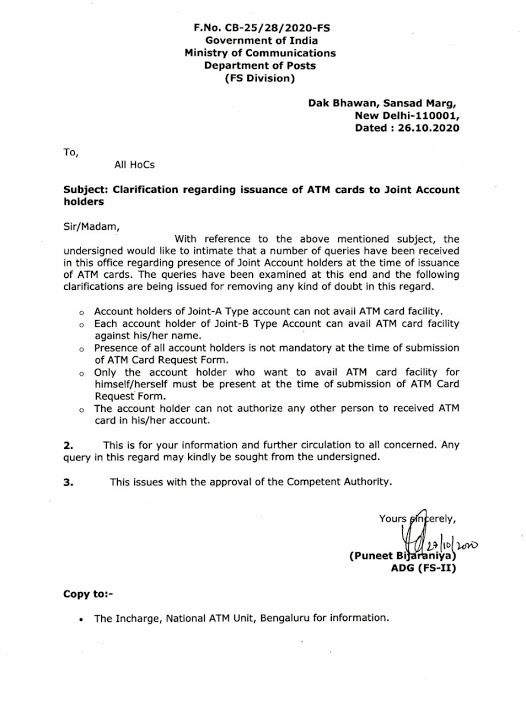
Issuance of ATM cards to Joint Account Holders: Department of Posts Clarification
F.No.CB-25/28/2020-FS
Government of India
Ministry of Communications
Department of Posts
(FS Division)
Dak Bhawan, Sansad Marg,
New Delhi-110001,
Dated: 26.10.2020
To,
All HoCs
Sir/Madam,
With reference to the above mentioned subject, the undersigned would like to intimate that a number of queries have been received in this office regarding presence of Joint Account holders at the time of issuance of ATM cards. The queries have been examined at this end and the following clarifications are being issued for removing any kind of doubt in this regard.
2. This is for your information and further circulation to all concerned. Any query in this regard may kindly be sought from the undersigned.
3. This issues with the approval of the Competent Authority.
Yours sincerely,
(Puneet Bijaraniya)
ADG (FS-II)